Static Credentials Mapping
Static Credentials Mapping is an extension of Static Credentials that maps a different set of device credentials to each connecting remote user (i.e. each RADKit Client identity). This is useful when different Cisco Engineers should log in to the same device using their own individual credentials rather than a single shared account.
The mapping is evaluated top-to-bottom. RADKit matches the identity of the connecting remote user (their email address) against each entry’s Remote User field and uses the first matching entry’s username and password. Entries below the first match are not checked.
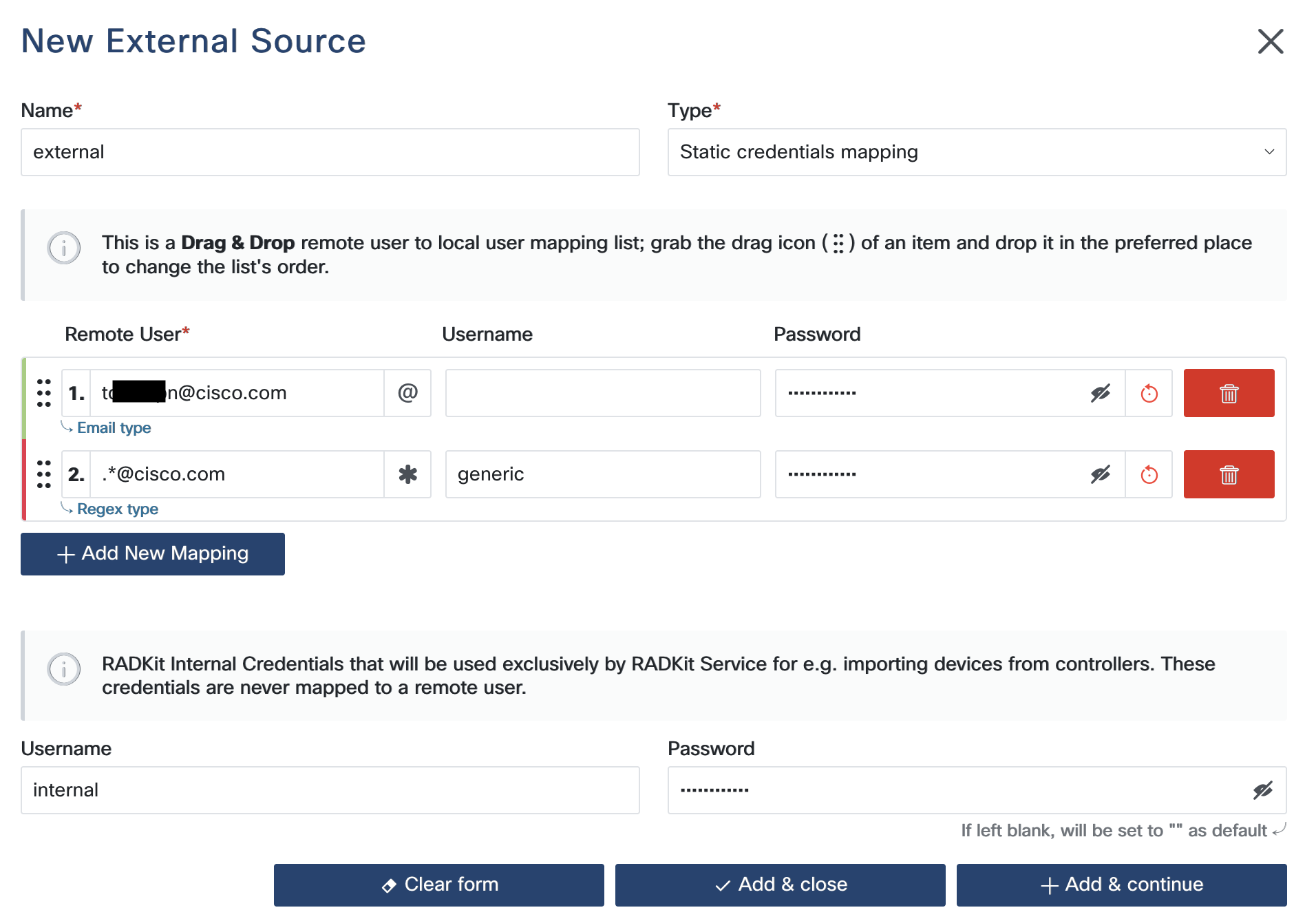
Configuration Steps
Internal Credentials
These credentials are used when a connection is initiated internally by RADKit itself (for example, by a connector), rather than by a remote RADKit Client.
Internal Username: The username RADKit Service will use for internally triggered device connections.
Internal Password: The password for the internal username above. Stored encrypted in the RADKit Service database.
Mapping Entries
Each entry defines a mapping from a remote user identity to a set of device credentials. Entries are evaluated in the order they appear; drag and drop to reorder them.
Remote User: The identity of the connecting RADKit Client user. This can be:
An email address (exact match), for example
alice@example.com.A regular expression (regex match), for example
.*@example.comto match any user from that domain. Toggle the entry type between email and regex using the@/*button next to the field.
Username: The device username to use when this remote user triggers a connection.
Password: The device password corresponding to the username above. Stored encrypted in the RADKit Service database.
Note
Each Remote User value must be unique within the mapping. Duplicate entries are not allowed. If no entry matches the connecting user’s identity, the connection attempt will be rejected with a credentials-not-found error.
Usage
Reference the external source by name in the device YAML configuration. The connecting
remote user’s identity is passed automatically — no additional values parameter is
needed.
Use !external-key, which automatically selects the field matching the parent key
name (e.g. username or password):
terminal:
  username: !external-key <name_of_external_source>
  password: !external-key <name_of_external_source>
Alternatively, use !external with an explicit use: parameter:
terminal:
  username: !external
    name: <name_of_external_source>
    use: username
  password: !external
    name: <name_of_external_source>
    use: password